
Static Components are the purely visual elements of your project. Unlike Form Frames, these tools do not capture data; they are used strictly for design, layout, and building a professional look that aligns with your brand requirements.
Overview
- Where to Find Them?
- Typography & Messaging
- Visual Media
- Layout & Structure
- Action & Movement
- Security & Urgency
Where to Find Them?
The Static Components toolbar is located on the right side of your screen. The toolbar remains the same regardless of the type of experience you are building.
Typography & Messaging
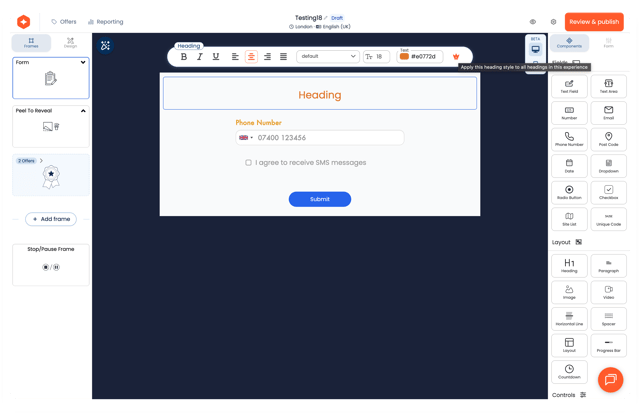
- Heading & Paragraph: Use these to introduce your brand or provide instructions. You can personalize the style, font, color, and alignment.
- Global Styling: To save time, click the crown icon to set the componet as the "Master" for this type of component and instantly update every block of that type across your entire experience.
Visual Media
- Image: Upload new assets or choose from your Gallery. You can sort your library by date or alphabetically to find the perfect visual quickly.
.png?width=627&height=347&name=Frame%202%20(1).png)
-
Video: Embed a video by simply pasting a URL into the provided field.
.png?width=523&height=185&name=Frame%201%20(1).png)
Layout & Structure
- Layout Component: Create organized grids containing 2 to 5 columns to neatly display multiple assets side-by-side.
- Spacer: Add breathing room between elements. Choose from preset heights (15px, 30px, or 45px) or enter a custom pixel value.
- Horizontal Line: Use this to visually divide sections for better readability.
Action & Movement
CTA Button: The "Call to Action" button can redirect users to an external link or a specific Target Frame (like "Next Frame") within your experience.
Progress Bar: Choose between a Loading bar or a Steps bar to show users how far they are in the journey.
Security & Urgency
- Captcha: Ensure data quality by blocking automated robots from entering your experience. You can choose a light or dark theme, or make it invisible.
- Countdown: Build anticipation for expiring prizes. You can style the timer to match your brand and set a custom "Time Over Message" for when the clock hits zero.