
The Knowledge Quiz is a high-engagement experience built around questions with correct and incorrect answers. It is a powerful tool for fashion brands and consumer goods to drive customer interaction by testing their brand savvy. By rewarding correct answers with points, you can deliver personalized "Outcome Offers" on the final success frame based on a customer's total score.
Note: This guide focuses specifically on the set-up for the Knowledge Quiz. For general setup and offer configuration, see our Design Your First Experience guide.
Journey Overview
- Step 1: The Setup - Choosing your Creation Path
- Step 2: The Stakes - Creating outcome offers and rewards
- Step 3: The Challenge - Building questions
- Step 4: The Finish Line - Publishing your experience.
Step 1: The Spark (Setup)
To begin your quiz, select your starting method:
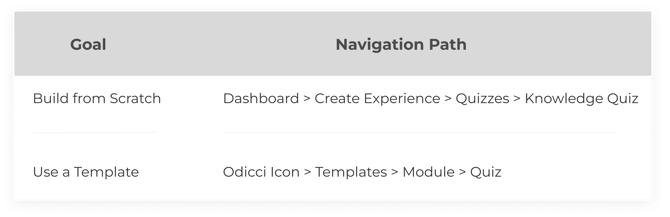
Step 2: The Stakes (Offers)
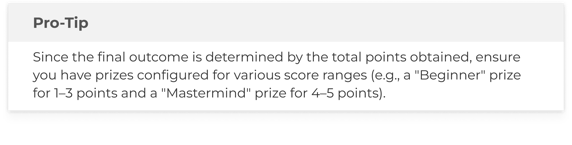
Before writing the questions, define what your customers can win. In the Offers tab, you must create at least one Outcome Offer:
- Customization: Modify the offer name, upload an engaging image, and choose whether to display a reward or a unique voucher code.
- Automation: Select the email notification that will be triggered when a customer lands on a specific outcome.
.png?width=324&height=473&name=MacBook%20Air%20-%201%20(1).png)
Step 3: The Challenge (Studio)
Use Multitext or Multiimage frames in the Studio to present your questions.
.png?width=392&height=320&name=MacBook%20Air%20-%202%20(1).png)
- Enter Content: Provide a clear question or statement for each frame.
- Choices: Add your different answer options.
- The Dropdown: Use the dropdown menu next to each choice to indicate if it is "Correct" or "Incorrect".
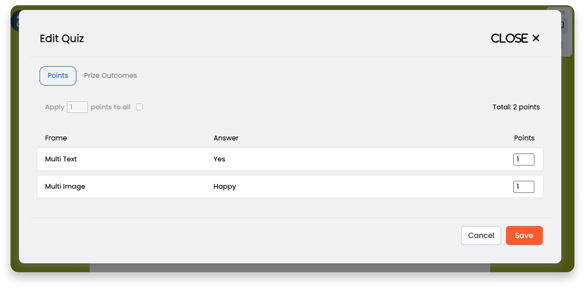
- Enable points (optional): Set how many points you'd like to allocate for each question or set all to 1 point.
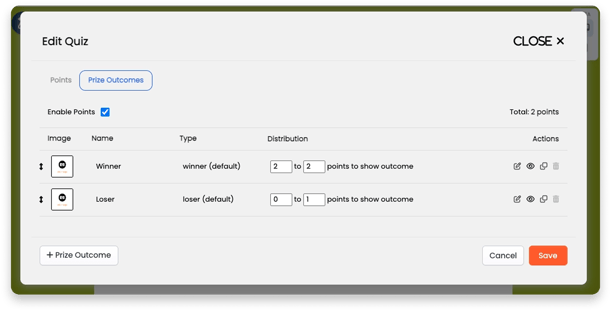
- Offer outcomes: Set the thresholds needed for each offer to be allocated.
Note: Points are only added to a customer's total when they select a choice marked as "Correct".
Step 4: The Finish Line
Once your questions are set and your design is polished, head to the Confirm tab. Here, you can publish your experience to make it live and accessible to your customers.