
Reporting is built exclusively to benefit and track the progress of all the experiences.
This article helps to understand all the features that are built to benefit from reporting
Once login is successful to the platform, it shows a 'Report' menu. Upon selecting, shows all the experiences built inside the account. To go to a specific experience, click 'View reporting' from Actions
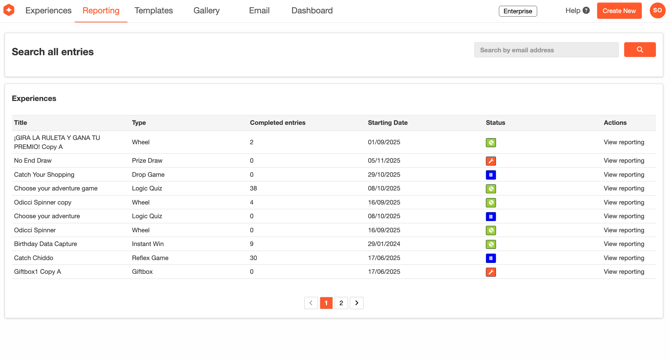
The next page shows all detailed reporting to the specific experience.
Audience
Audience bar from the left navigation pane shows all reporting information about the audience engagement and impressions which includes Overview, All Entries and Unique entries
Overview
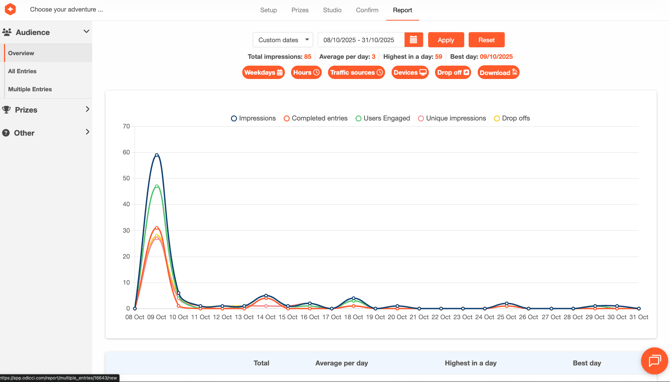
Overview shows a graphical chart of all impressions, unique impressions, drop offs and completed entries. The dates for the report can also be customized.
Impressions - This is basically an entry of any activity from the experience (Both Drop offs and Completed entries are considered as impressions)
Unique Impressions - This is an entry of only the unique activity from the experience (Unique drop off and completed entry)
Users Engaged - Users that have started but not completed their experience
Drop offs - All incomplete entries are considered as drop offs
Completed entries - This is all the successful entries from the experience.
All entries
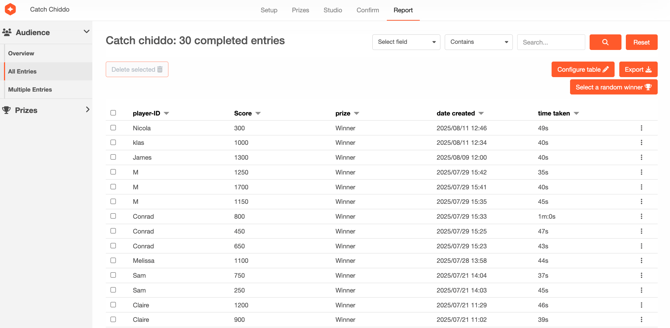
This shows all the completed entries captured via the experience. Search option is available and the necessary fields can be configured using the configure table. The data can be exported locally using Export option. Also a random winner can be selected for the experience involving a prize draw.