
Odicci can ingest data from an ESP or app via query parameters on the clickthrough to the Odicci experience. For example, you could merge an email address and first name.
In order for Odicci to receive these, corresponding fields must be created within the experience to map the sent fields to. This can be done either by using hidden fields or using a pre-filled frame.
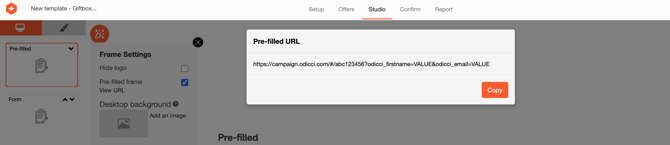
If passing over email address and first name, the URL for your CTA should look something like this where the VALUE placeholders have been replaced with your merge tags:
https://campaign.odicci.com/#/abc123456?odicci_email=%%email%%&odicci_firstname=%%firstname%%
Each ESP and app will use different merge tags so you will need to ensure that you are using the correct tags.
Here are some common ESPs and their email merge tags:
| ESP | Example |
| Bloomreach |  |
| Braze |  |
| Dotdigital | @EMAIL@ |
| Emarsys |  |
| Klaviyo |  |
| Mailchimp | *|EMAIL|* |
| Salesforce Marketing Cloud | %%EmailAddress%% |